Design Research · 06 / 08
Spatial Interfaces for Work
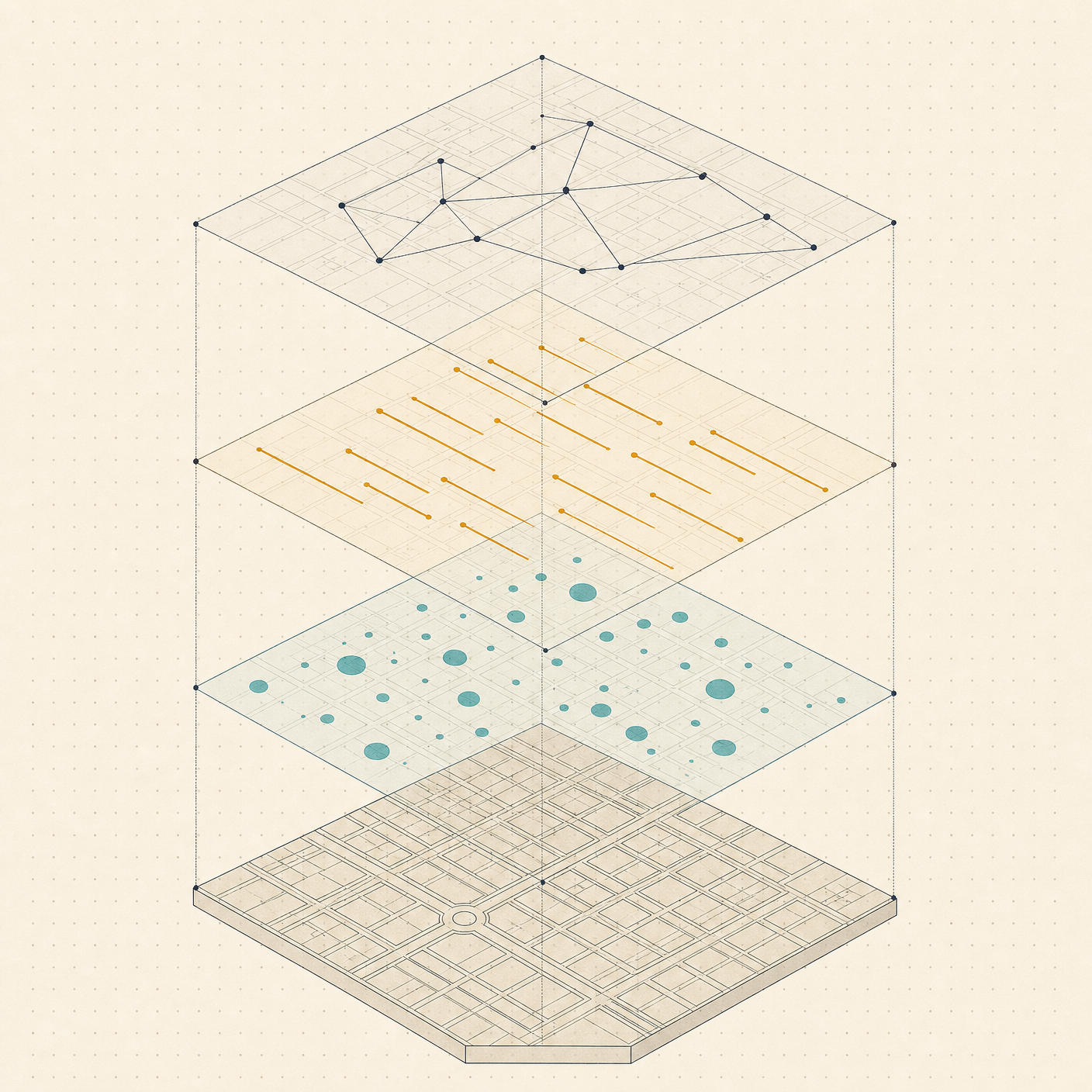
Precedents for work-as-space — the core Collaboration OS bet. The most load-bearing finding: the city-builder overlay is the strongest validated metaphor for the view-model engine — one stable spatial substrate, many togglable data lenses over the same map.
The Canvas Thinking Tools ("Studio Wall" Lineage)
- Milanote — explicitly "a studio wall, not a meeting room." Wins on warmth and feel; deliberately no API — a data island, the opposite of a synced field. The reference for atmosphere, not architecture
- Heptabase — the strongest proof that "cards in space" scales past the toy stage, if you give users tools for connection clutter (anchor points routing lines around obstacles) and provenance (highlight → drag-to-card)
- Kinopio, Kosmik, Scapple — lighter-weight thinking canvases; Are.na — channels as slow, non-algorithmic curation; Mymind/Napkin — the anti-organization foil (dump, AI retrieves, never file). The field is the opposite thesis: deliberate placement matters
- Muse (now Allume) — the research-pedigree cautionary tale: spun out of Ink & Switch, beloved, couldn't find a big-enough market; the team dispersed in 2023. Adam Wiggins' Muse retrospective is required reading before over-investing in beauty
Infrastructure: Build on tldraw
tldraw is the engine answer: React infinite-canvas SDK, production multiplayer sync, custom shapes/bindings, full runtime API — already powering ClickUp Whiteboards, Padlet, Jam. The "make real" experiments prove a canvas can host live, generative objects, not just stickies. Don't hand-roll the canvas.
The universal failure mode is canvas soup: infinite space + no structure = unnavigable mess. This is the central risk of the field — and why view models (imposed structure) are the right architecture. The canvas should rarely be truly freeform.
The Sleeper Idea: The Spatial Parser
The academic lineage — spatial hypertext (Marshall & Shipman's VIKI/VKB) — contributed one under-exploited insight: the spatial parser. The system reads the implicit structure users create through proximity, alignment, and color, so meaning emerges from layout without users declaring it. This is exactly the bridge between a freeform field and structured view models: let arrangement carry semantics, then detect it. (Also the intellectual home: Ink & Switch, local-first, programmable ink.)
Work Data as Map — Already Shipping
- Construction tools are the killer precedent. Fieldwire and Autodesk PlanGrid let you drag a task onto a floor plan; it becomes a pin whose color encodes status — a superintendent walking the site reads state without opening anything. This is literally the plan's "tasks on a sitemap / site plan" view model, validated with real users. Steal pin-color-as-status
- Dependency graphs (Linear, GitHub roadmaps) — useful when small and directed; hairballs at scale
- Sitemap-driven views — placing web-project tasks on the sitemap tree is a natural fit for a web studio
When a Graph Helps (and When It's a Hairball)
Node graphs win when the edges ARE the work (dataflow, execution order, dependency — n8n, ComfyUI, Unreal Blueprints) and lose when edges are merely "related." The Obsidian graph-view critique is the canonical warning: beautiful and almost useless — clean under ~50 notes, a reliable hairball by ~500; you can't query it, edit in it, or persist a rearrangement. A global "everything graph" is a demo, not a tool.
Corollary: force-directed auto-layout is the enemy of spatial memory — nodes move, so you can't remember where anything is. User-placed, persistent positions beat physics simulations.
Games and Maps — the Best-Designed Spatial Dashboards in Existence
Steal from strategy games and city builders:
- Fog of war — progressive disclosure: show known, dim stale
- Zoom levels of abstraction — strategic ↔ tactical
- City-builder overlays — toggle data layers (power, traffic, crime) over the same map. This is the swappable view model made concrete — one substrate, many lenses
- Minimap — persistent global orientation while zoomed in
Does Spatial Arrangement Actually Aid Memory?
Yes — the method-of-loci literature shows large recall gains driven by spatial binding — but only when positions are stable and user-authored. Auto-layout that reflows on every change destroys the benefit. Practical rules: persist positions, animate transitions between view models (don't teleport), let users hand-place.
The ZUI cautionary tale (Pad++, Raskin): pure zoom-navigation UIs failed — infinite zoom disorients. What survived is the technique: semantic zoom / level-of-detail (Pad++'s clock showing hours from afar, seconds up close). Ship semantic zoom as enhancement, never as primary navigation.
3D — Mostly Graveyards
3D task/data spaces have a near-perfect failure record (Looking Glass, BumpTop, 3D file managers): they add a navigation axis plus motion sickness, occlusion, and worse text legibility while rarely adding information. Verdict matches the plan's own instinct: 3D strictly optional and semantic — reserved for when the third axis carries real meaning (time as depth; a genuine floor plan). 2D stays the default; 3D is an earned mode, not a wow tax.
Load-Bearing Takeaways for Collaboration OS
- View models = city-builder overlays — one stable substrate, swappable lenses
- Tasks-on-a-plan is proven (Fieldwire) — pin-color-as-status
- Persist user-placed positions; never auto-reflow — this is what separates a field from a hairball
- Build on tldraw
- Semantic zoom yes; ZUI-as-navigation no
- 3D optional and meaningful, or not at all
- Spatial parser (VKB) — detect structure from arrangement; freeform and structured views reconcile
- Heed the Muse retrospective on market realities
Related
- Collaboration OS Design Research — hub
- The Work OS Landscape — the spatial-portfolio gap this fills
- Meeting Artifacts — meeting moments as field nodes
- Three-Dimensional Time — time-as-depth, the space-time cube (from the Time research)
- Collaboration OS Through the Pattern Language